New Tool! Surface Peel + Free Bonus: Adaptive Subdiv

I’m happy to share with you my recent tool: Surface Peel!

It comes with lots of features that allow for a full control over artistic direction and final look.

This tool let’s you easily create a damaged, abandoned or haunted look with peeling paint, edge wear, weathered surfaces in Blender. Great for environments, smaller assets and curved surfaces – all done with procedurally generated geometry.

Check out all of it’s features here: Superhive or Gumroad.

Scroll down for a free Adaptive Subdiv & Culling geometry nodes asset.

Adaptive Subdiv + Culling (Free)

During the development of Surface Peel I created a geometry nodes group for Adaptive Subdivision and Culling which is able to cut the evaluation time by half!

If you’re working with nodes yourself you may find use for this group in your own setups. Can be used as a standalone modifier as well!

Get it here: https://nodesinteractive.com/AdaptiveSubdiv_Culling1.0.blend

Compatible with Blender 4.5+.

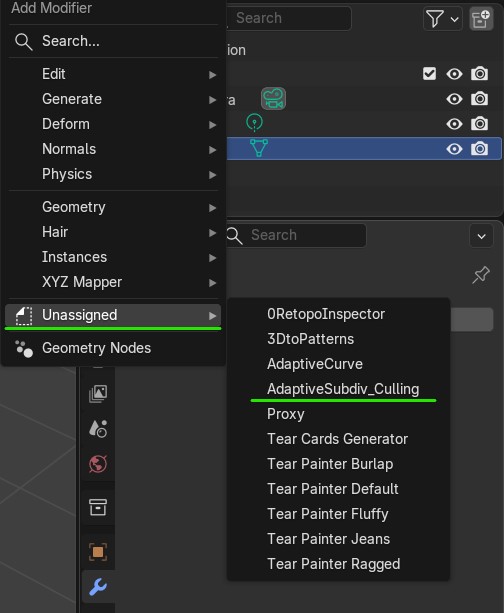
To install it simply set the folder containing downloaded Blend file as Asset Library in Preferences. Once done, you’ll find it in the Asset Browser or in the Modifier drop-down list in Unassigned.

The UVs are preserved:

Easing Functions in Geometry Nodes (Free)

Easing Functions is a compact Geometry Nodes group with all ready-to-use math equations for mesh deformation and animation. This geometry nodes setup was done with Blender 4.5, however since it uses simple math nodes it will work with previous versions as well. Here’s link to the file: https://nodesinteractive.com/EasingFunctions_AssetLibrary_UnpackToUse.zip To install it unpack the zip file…

Read more

News Update! – Solidify Plus, Tear Cards Generator & Tear Painter 1.2

Solidify Plus A couple of things happened since the last update here. Solidify Plus was added to my products portfolio, bringing functionality of rim loops and advanced bevel and crease controls to Blender. As always it’s a fully geometry nodes powered addon that after setting up can be easily accessed through modifier list. Links: https://superhivemarket.com/products/solidify-plus…

Read more

Update Drop! – UV Stretch preview in 3d/ XYZ Mapper/ GSurface Gen/ Adaptive Curve

It’s time for a bigger update! First of all a free geonode setup for previewing UV stretching in 3d. In the vid below you can see how geonode/ shader tree for this is assembled. https://youtu.be/A9uKtULyQUg Here’s the link to the Blend file (Compatible with Blender 4.2+): https://nodesinteractive.com/uvstretch.blend Hotfix 1.1! Now stretching is calculated per UV Island: https://nodesinteractive.com/uvstretch1.1.blend…

Read more

Hair Press Collider

Introduction This is a very simple setup done with geometry nodes, that will help you hide the hair underneath a hat, cap, belt or whatever. You can find a walkthrough and a quick look at geonodes in the video below: https://youtu.be/hUwZkahd5QI Files This geometry nodes modifier is compatible with Blender 4.2+. https://nodesinteractive.com/HairPressCollider.blend Installation Follow the…

Read more

New Site & New Tool!!!

I’m excited to share my newest tool with you that I’ve been cooking for past couple of months! Tear Painter is here! Available on Blender Market and Gumroad.On top of that the tools by Nodes Interactive will have a legit hub for manuals. At moment the site is work in progress, so for now you…

Read more