News Drop! Loop Cut Pro/Ring Path Selection/Solidify Plus/Adaptive Curve/Tear Painter
It’s been a while since I posted – busy times. Let’s gather here what’s new!…


I’m happy to share with you my recent tool: Surface Peel!
It comes with lots of features that allow for a full control over artistic direction and final look.
This tool let’s you easily create a damaged, abandoned or haunted look with peeling paint, edge wear, weathered surfaces in Blender. Great for environments, smaller assets and curved surfaces – all done with procedurally generated geometry.
Check out all of it’s features here: Superhive or Gumroad.
Scroll down for a free Adaptive Subdiv & Culling geometry nodes asset.


Adaptive Subdiv + Culling (Free)
During the development of Surface Peel I created a geometry nodes group for Adaptive Subdivision and Culling which is able to cut the evaluation time by half!
If you’re working with nodes yourself you may find use for this group in your own setups. Can be used as a standalone modifier as well!
Get it here: https://nodesinteractive.com/AdaptiveSubdiv_Culling1.0.blend
Compatible with Blender 4.5+.
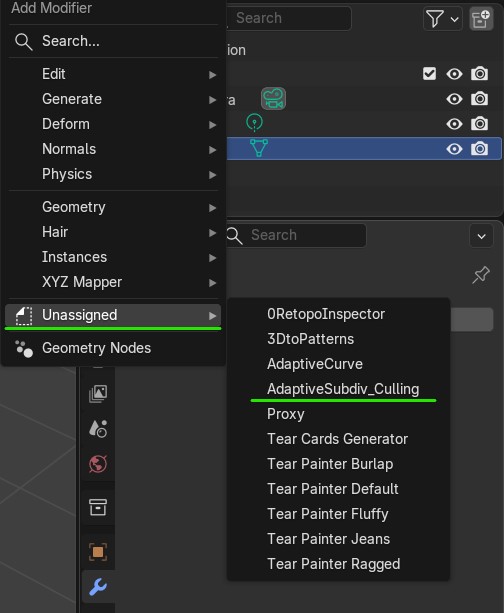
To install it simply set the folder containing downloaded Blend file as Asset Library in Preferences. Once done, you’ll find it in the Asset Browser or in the Modifier drop-down list in Unassigned.

The UVs are preserved:


It’s been a while since I posted – busy times. Let’s gather here what’s new!…

Easing Functions is a compact Geometry Nodes group with all ready-to-use math equations for mesh…

An update to Laces Generator – a procedural geometry nodes solution for Blender – is…

Solidify Plus A couple of things happened since the last update here. Solidify Plus was…

It’s time for a bigger update! First of all a free geonode setup for previewing…

After a couple months of intense dev I can finally share newest update to Retopo…

Pretty important update for Belt Maker is here. Belt Maker 1.6 comes with speed-up, flexibility…

Introduction This is a very simple setup done with geometry nodes, that will help you…

Introduction From time to time I like to do an exercise in geometry nodes to…

I’m excited to share my newest tool with you that I’ve been cooking for past…